Fat & SNF rates by Formula 1 (Kilo Fat)
Set your Fat & SNF rates with Formula 1 (Kilo Fat): Rate × SNF Base % × (FAT + ⅔ SNF). Generate the chart whether it is empty or already has rates, check every rate before it is saved, then give clients Fat/SNF.
Opening the pages…
The guide in words
Everything on the pages above, to read or search.
MILK RATES
Fat & SNF rates by Formula 1
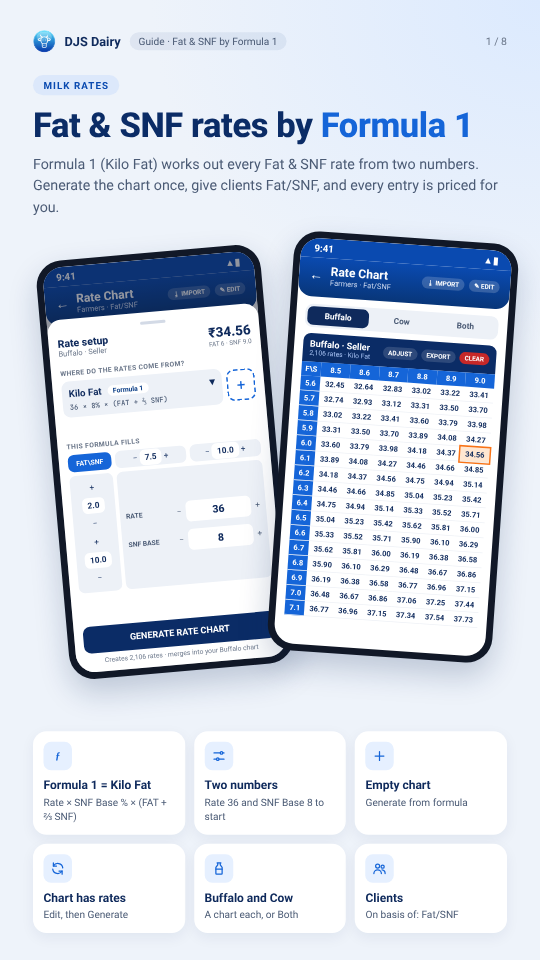
Formula 1 (Kilo Fat) works out every Fat & SNF rate from two numbers. Generate the chart once, give clients Fat/SNF, and every entry is priced for you.
← Rate Chart
Rate Chart
34.56: ₹Both
Bu Buffalo · Seller
6 · SNF 9.0
E FROM?
F\S 5.6
Kilo: 36 × 8% ×
33.50 33.70 33.79
THIS FAT\SNF
+ 2.0
ENERATE R: G
Formula 1 = Kilo Fat: Rate × SNF Base % × (FAT + ⅔ SNF)
Two numbers: Rate 36 and SNF Base 8 to start
Empty chart: Generate from formula
Chart has rates: Edit, then Generate
Buffalo and Cow: A chart each, or Both
Clients: On basis of: Fat/SNF
FORMULA 1 · KILO FAT
How Formula 1 prices a litre
Two numbers you set, and the milk's FAT and SNF. The app works out every rate in the chart this way.
Rate × SNF Base ÷ 100 × (FAT + ⅔ × SNF)
In the app: 36 × 8% × (FAT + ⅔ SNF)
Buffalo milk · FAT 6.0 · SNF 9.0
Rate × SNF Base ÷ 100
36 × 8 ÷ 100 = 2.88
FAT + ⅔ × SNF
6.0 + 6.0 = 12.0
2.88 × 12.0 = ₹34.56
Cow · FAT 3.5 · SNF 8.5
FAT 6 · SNF 9, Rate 37
FAT 6 · SNF 9, SNF Base 8.5
Not the same as Formula 2: Formula 2 (Fat + SNF Rate) is FAT × Fat Rate + SNF × SNF Rate, a different chart. For Formula 1, pick Kilo Fat.
Rate: The main number: ₹1 more adds ₹0.96 a litre at FAT 6 · SNF 9.
SNF Base: Usually 8. 8.5 instead of 8 adds about 6% to every rate.
Rounded: Each rate to 2 decimals; the amount is litres × rate.
Where: Settings › Milk Rate Settings › Fat & SNF
STEP 1 · OPEN
Open the Fat & SNF chart
Settings › Milk Rate Settings. Under For Farmers (milk you buy) or For Customers (milk you sell), tap Fat & SNF.
← Milk Rate Settings
⭳ IMPORT ✎ EDIT
How each client's rate is worked out.
For Farmers — milk you buy
One rate for each degree of fat.
Same rate per litre, whatever the milk tests.
🐃 🐄
2,106 rates · Kilo Fat
6 × 7.5 3.5 × 6.5
₹45.00 ₹22.75
₹62.00 ₹48.00
5.6 32.45 32.64 32.83 33.02 33.22 33.41
5.7 32.74 32.93 33.12 33.31 33.50 33.70
5.8 33.02 33.22 33.41 33.60 33.79 33.98
Rate looked up in a fat × SNF chart.
Same chart, read off a lactometer instead of SNF.
5.9 33.31 33.50 33.70 33.89 34.08 34.27
🐃 🐄
6.0 33.60 33.79 33.98 34.18 34.37 34.56
6 · 9 3.5 · 8.5 ₹26.40
No chart yet. Tap to set it up.
6.1 33.89 34.08 34.27 34.46 34.66 34.85
6.2 34.18 34.37 34.56 34.75 34.94 35.14
6.3 34.46 34.66 34.85 35.04 35.23 35.42
6.4 34.75 34.94 35.14 35.33 35.52 35.71 6.5 35.04 35.23 35.42 35.62 35.81 36.00
1: For Customers — milk you sell
6.6 35.33 35.52 35.71 35.90 36.10 36.29 6.7 35.62 35.81 36.00 36.19 36.38 36.58
6.8 35.90 36.10 36.29 36.48 36.67 36.86
One rate for each degree of fat.
Same rate per litre, whatever the milk tests.
6.9 36.19 36.38 36.58 36.77 36.96 37.15
🐃 🐄
7.0 36.48 36.67 36.86 37.06 37.25 37.44
6 × 6 3.5 × 6.5
₹36.00 ₹22.75
₹44.00 ₹50.00
7.1 36.77 36.96 37.15 37.34 37.54 37.73
Farmers, customers: Two separate charts: set each one you use.
Buffalo, Cow, Both: A chart each. Both puts Buffalo's numbers in both.
Who can: The owner, or staff with the Milk Rate Settings permission.
Where: Settings › Milk Rate Settings › Fat & SNF
CASE A · EMPTY CHART
No rates yet? Generate them
The chart says “No rates in this chart yet”. Tap Generate from formula. Kilo Fat (Formula 1) is already picked: check the two numbers and tap Generate rate chart.
← Rate Chart
← Rate Chart
⭳ IMPORT ✎ GENERATE
⭳ IMPORT ✎ EDIT
₹34.56Both
FAT 6 · SNF 9.0
WHERE DO THE RATES COME FROM?
Kilo Fat: 36 × 8% × (FAT + ⅔ SNF)
No rates in this chart yet: Fill it in either of these two ways
ƒ GENERATE FROM FORMULA: Pick a ready-made formula or write your own — the app builds every rate for you.
− 3 +
⭳ IMPORT EXCEL FILE
Already have your rate chart in an Excel file? Load it in.
Creates 2,106 rates · merges into your Buffalo chart
Kilo Fat · Formula 1: Picked for you. Something else there? Tap the box and choose it.
Rate and SNF Base: Set yours; the ₹ at the top shows FAT 6 · SNF 9 as you go.
The range: FAT 2.0–10.0, SNF 7.5–10.0. Milk above FAT 10? Raise the FAT end.
Where: Fat & SNF › Generate from formula
CHECK AND GENERATE
Check every rate, then Generate
“Check before generating” shows every rate Formula 1 makes. Tap Generate: the chart is ready, and entries use it at once.
← Rate Chart
← Rate Chart
⭳ IMPORT ✎ EDIT
⭳ IMPORT ✎ EDIT
KiloBuffaloFat·36 × 8% × (FATCow+⅔SNF)
2,106 rates · FAT 2–10 · SNF 7.5–10 FAT 6 · SNF 9.0 pays ₹34.56
2,106 rates · Kilo Fat
5.8 33.22 33.41 33.60 33.79 33.98
5.6 32.45 32.64 32.83 33.02 33.22 33.41
5.9 33.50 33.70 33.89 34.08 34.27
5.7 32.74 32.93 33.12 33.31 33.50 33.70
6.0 33.79 33.98 34.18 34.37 34.56
5.8 33.02 33.22 33.41 33.60 33.79 33.98
6.1 34.08 34.27 34.46 34.66 34.85
5.9 33.31 33.50 33.70 33.89 34.08 34.27
6.2 34.37 34.56 34.75 34.94 35.14
6.0 33.60 33.79 33.98 34.18 34.37 34.56
6.3 34.66 34.85 35.04 35.23 35.42
6.1 33.89 34.08 34.27 34.46 34.66 34.85
6.4 34.94 35.14 35.33 35.52 35.71
6.2 34.18 34.37 34.56 34.75 34.94 35.14
6.5 35.23 35.42 35.62 35.81 36.00
6.3 34.46 34.66 34.85 35.04 35.23 35.42
Scroll the table to check any rate
6.4 34.75 34.94 35.14 35.33 35.52 35.71
Your Buffalo chart is empty — all of these will be added.
6.5 35.04 35.23 35.42 35.62 35.81 36.00
6.6 35.33 35.52 35.71 35.90 36.10 36.29
6.7 35.62 35.81 36.00 36.19 36.38 36.58
6.8 35.90 36.10 36.29 36.48 36.67 36.86
6.9 36.19 36.38 36.58 36.77 36.96 37.15
7.0 36.48 36.67 36.86 37.06 37.25 37.44
7.1 36.77 36.96 37.15 37.34 37.54 37.73
Chart ready — 2,106 rates
Cow too: Switch to Cow and generate again, or pick Both first.
Customers too: Do the same under For Customers.
One rate off?: Hold that rate in the chart to change just that one.
Where: Generate rate chart › Generate
CASE B · CHART HAS RATES
Have a chart? Switch it to Formula 1
Tap Edit, pick Kilo Fat (Formula 1), set the numbers and tap Generate rate chart. The check shows what changes before anything is saved.
← Rate Chart
← Rate Chart
⭳ IMPORT ✎ EDIT
⭳ IMPORT ✎ EDIT
Kilo Fat · 36 × 8% × (FAT + ⅔ SNF) Buffalo
2,106 rates · FAT 2–10 · SNF 7.5–10 FAT 6 · SNF 9.0 pays ₹34.56
2,106 rates · Kilo Fat
Optional 9.0
8.7 5.6 32.45 32.64 32.83 33.02 33.22 33.41
5.8 33.22 33.41 33.60 33.79 33.98
5.7 32.74 32.93 33.12 33.31 33.50 33.70
5.9 33.50 33.70 33.89 34.08 34.27
5.8 33.02 33.22 33.41 33.60 33.79 33.98
6.0 33.79 33.98 34.18 34.37 34.56
5.9 33.31 33.50 33.70 33.89 34.08 34.27
6.1 34.08 34.27 34.46 34.66 34.85
6.0 33.60 33.79 33.98 34.18 34.37 34.56
6.2 34.37 34.56 34.75 34.94 35.14
6.1 33.89 34.08 34.27 34.46 34.66 34.85
6.3 34.66 34.85 35.04 35.23 35.42
6.2 34.18 34.37 34.56 34.75 34.94 35.14
6.4 34.94 35.14 35.33 35.52 35.71
6.3 34.46 34.66 34.85 35.04 35.23 35.42
6.5 35.23 35.42 35.62 35.81 36.00
6.4 34.75 34.94 35.14 35.33 35.52 35.71
Scroll the table to check any rate
6.5 35.04 35.23 35.42 35.62 35.81 36.00
1,846 rates updated · 260 added · 355 kept as they are
6.6 35.33 35.52 35.71 35.90 36.10 36.29 6.7 35.62 35.81 36.00 36.19 36.38 36.58
6.8 35.90 36.10 36.29 36.48 36.67 36.86
6.9 36.19 36.38 36.58 36.77 36.96 37.15
7.0 36.48 36.67 36.86 37.06 37.25 37.44
7.1 36.77 36.96 37.15 37.34 37.54 37.73
Merged, not replaced: Rates in the range change; rates outside it stay as they were.
Only Formula 1?: Tap Clear first (each milk), then generate.
No undo: Generate and Clear can't be undone. Export first for a copy.
Where: Fat & SNF › Edit › Generate rate chart
STEP · CLIENTS
Give your clients Fat/SNF
In Add Client or Edit Client, set On basis of to Fat/SNF. Their entries take the rate from this chart.
← Edit Client
← Dashboard
Using Per litre
₹34.56 ₹362.88
10.5 × 34.56 = 362.88
Saved entries: Keep their rate. New entries use the new chart.
Out of the range: Fat or SNF not in the chart gives ₹0 in red: widen the range.
Raise all later: Adjust: ₹ or % on every rate at once.
Where: Side menu › Edit Client
Formula 1 in 4 steps
Do it once for each chart you use.
1 Settings › Milk Rate Settings › Fat & SNF
2 Empty: Generate from formula · Has rates: Edit
3 Kilo Fat (Formula 1): Rate, SNF Base, Generate
4 Clients: On basis of › Fat/SNF
Questions?: Side menu › Help & contact
Support team: Chat with us on WhatsApp
Community group: Tips and news on Telegram
Each chart on its own: Farmers and customers, buffalo and cow: four charts in all.
Rate changed later?: Set it and generate again; nothing changes until you do.
On every phone: The chart goes to the web and your other phones on the next sync.
Asked which rates to use?: Pick ‘Use this chart’.
Thank you for running your dairy with DJS Dairy.